FOR INDEPENDENT BOOKKEEPERS
Client invoices. Ready for your review.
Turn an occasional client invoice batch into a reviewable CSV. Follow the source for each field, resolve exceptions, and keep the printed signs on credit notes.
Free preview. $9 when you export.
Up to 20 documents · One payment · No account
EARLY RELEASE Check the output with your own documents before paying.
A SMALL WALKTHROUGH
From paperwork to a row you can check.
This example uses fictional documents. Explore the steps; no upload or payment is needed.
INV-0001
- Issued
- October 14, 2026
- Due
- 2026-10-28
Workshop and office supplies 103.00
- Subtotal
- 103.00
- Tax
- 8.24
- Document total
- USD 111.24
FICTIONAL EXAMPLE · NO PAYMENT REQUESTED
START WITH THE FILES YOU HAVE
Upload a small batch.
PDFs, JPGs or PNGs. One receipt, invoice or credit note per file. Scans use OCR; readable PDFs can use their embedded text.
Up to 3 pages and 8 MB per file. Up to 20 documents and 20 MB per batch. English documents only.
Your check comes before checkout.
Actual workspace, fictional sample. A quote points to source text. Ambiguous values stay blank; unusual totals and credits need acknowledgement.
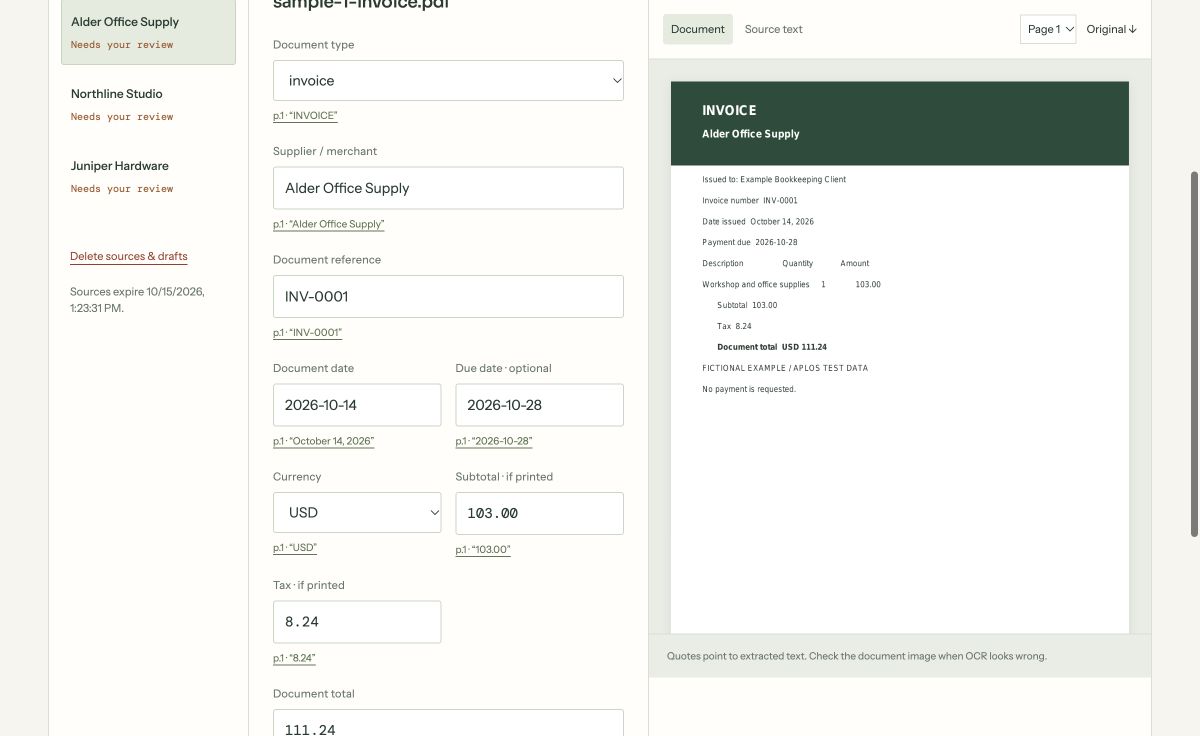
AI and OCR can be wrong. A matching quote is evidence to review, not a guarantee of correctness.
Usable rows, with the exceptions recorded.
The CSV includes source filename, type, supplier, reference, dates, currency, subtotal, tax, total, review note and review time.
| Supplier | Type | Currency | Subtotal | Tax | Total |
|---|---|---|---|---|---|
| Alder Office Supply | Invoice | USD | 103.00 | 8.24 | 111.24 |
| Juniper Hardware | Credit note | GBP | -145.00 | -11.60 | -156.60 |
Currencies stay separate. No conversion or combined total. Credit signs stay as printed.
Download this fictional CSV ↓THE JOB TO FINISH
A small cleanup job still needs careful review.
Mixed invoice layouts, a credit note, and a date that could mean two things. Before those files become usable rows, someone has to check them against the source.
WHAT DOCUMENT DESK DOES
Put the source beside the decision.
Follow a field’s quote back to the extracted text. Resolve missing values, exclude duplicates and add notes for exceptions. Each included document needs your explicit review before export.
Preview a client batch →A useful fit
For occasional cleanup batches that need spreadsheet rows before you decide how they belong in the books. Keep each client in a separate batch.
Know the limits
This does not post to a ledger, assign account codes, extract line items or provide a shared client portal. It is not a replacement for your accounting system.
ONE BATCH. ONE PAYMENT.
Preview first.
Pay for the reviewed CSV.
Finish your review before checkout. Your purchase unlocks that exact CSV and a private download link sent to your checkout email.
$9 USD / batch
Up to 20 documents
No subscription or setup call
Download access for 7 days
Free to upload, extract and review within early-release capacity limits.
BEFORE YOU START
A few practical details.
Will this import straight into my accounting software?
The output is a general CSV with document totals and review notes. It is not a QuickBooks or Xero import template. Check your system’s requirements and map fields before importing anything.
Do I need to connect anything?
No account, accounting connection or extraction template. Keep this browser to return to an unfinished batch. Your CSV opens in spreadsheet software.
What happens when extraction is uncertain?
Missing or ambiguous required values block export until you resolve them. You can correct fields, explain warnings or exclude a document. Every included document needs your explicit review.
Which currencies are supported?
USD, EUR, GBP, CAD, AUD, NZD, CHF and JPY. A currency is recorded for each document. Dollar and yen symbols alone are not assumed to identify a currency. Nothing is converted.
Where do my documents go?
Files are processed on Railway. Extracted text is sent to Cloudflare AI. Sources, page previews and drafts expire after 24 hours and can be deleted sooner. Paid CSVs have a separate 7-day download window. Only upload files you have permission to process.
Is this proven on every kind of invoice?
No. This is an early release tested on synthetic documents and controlled payment flows. Real-world accuracy varies. Try your files and check the source before buying. There are no customer accuracy or time-saving guarantees.
Try one batch. See what you get.
Preview a client batch →Free preview · $9 export · No subscription